How Much Does a Business Website Cost and Why Prices Differ So Much
A business website can cost very differently because the word “website” can mean completely different things. For one business, it may be a simple page with a service description, a contact button, and basic information. For another, it may be a full sales tool with a well-planned structure, mobile version, SEO preparation, lead forms, admin panel, analytics, catalog, payment, or integrations.
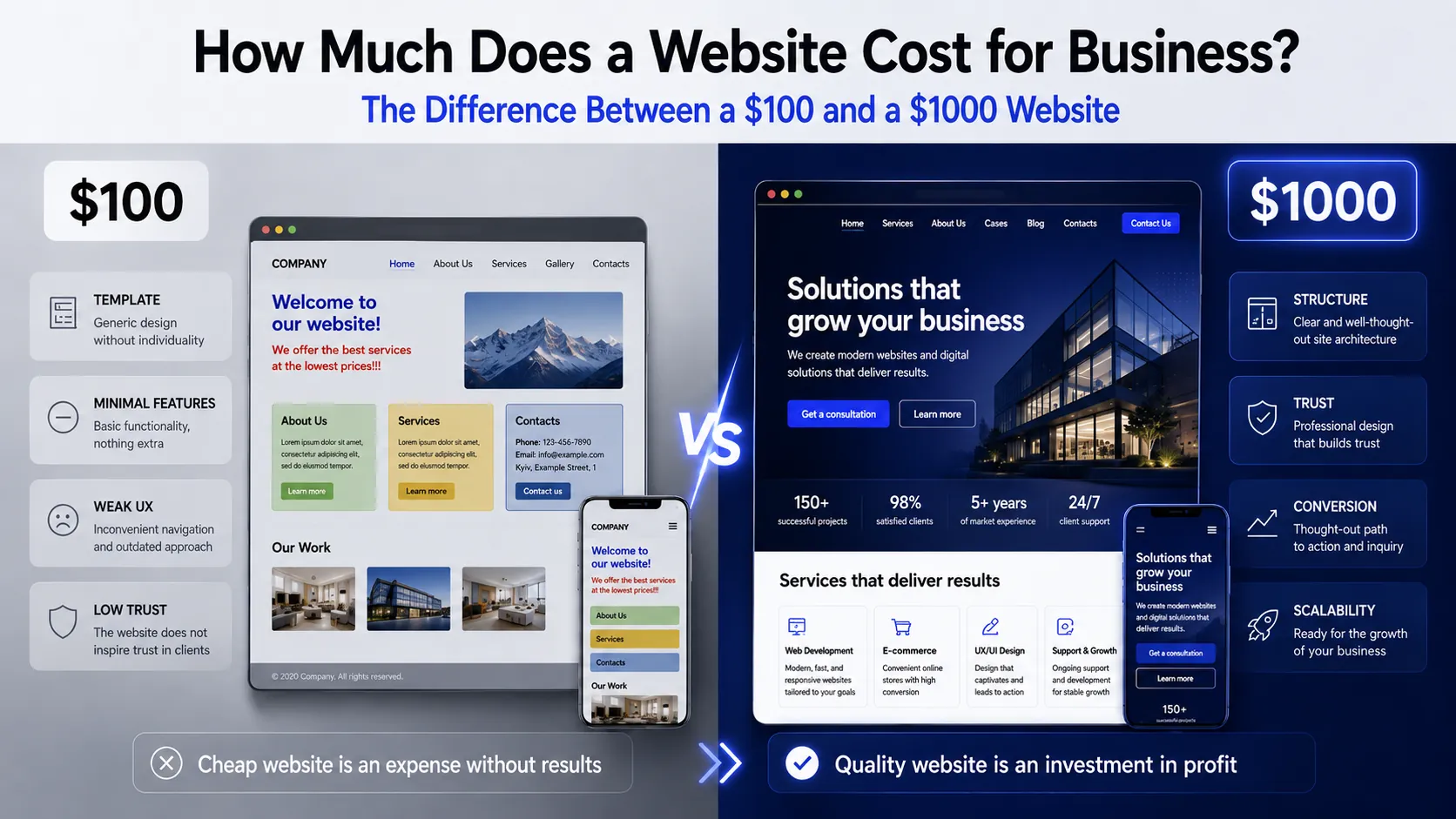
That is why a $100 website and a $1000 website cannot always be compared only by their visual appearance. At first glance, both may have a hero section, several content blocks, and a “Submit request” button. But the real difference is often inside: how well the structure is planned, whether the website is convenient on mobile, whether content can be edited, whether the website is ready for advertising and SEO, how fast it loads, whether the forms work correctly, and whether it can be developed further.
A cheaper website usually covers a basic need: to appear online quickly, show minimal information, or test an idea. This can be a reasonable solution if the business really needs a simple page without complex logic, SEO strategy, integrations, or future scaling.
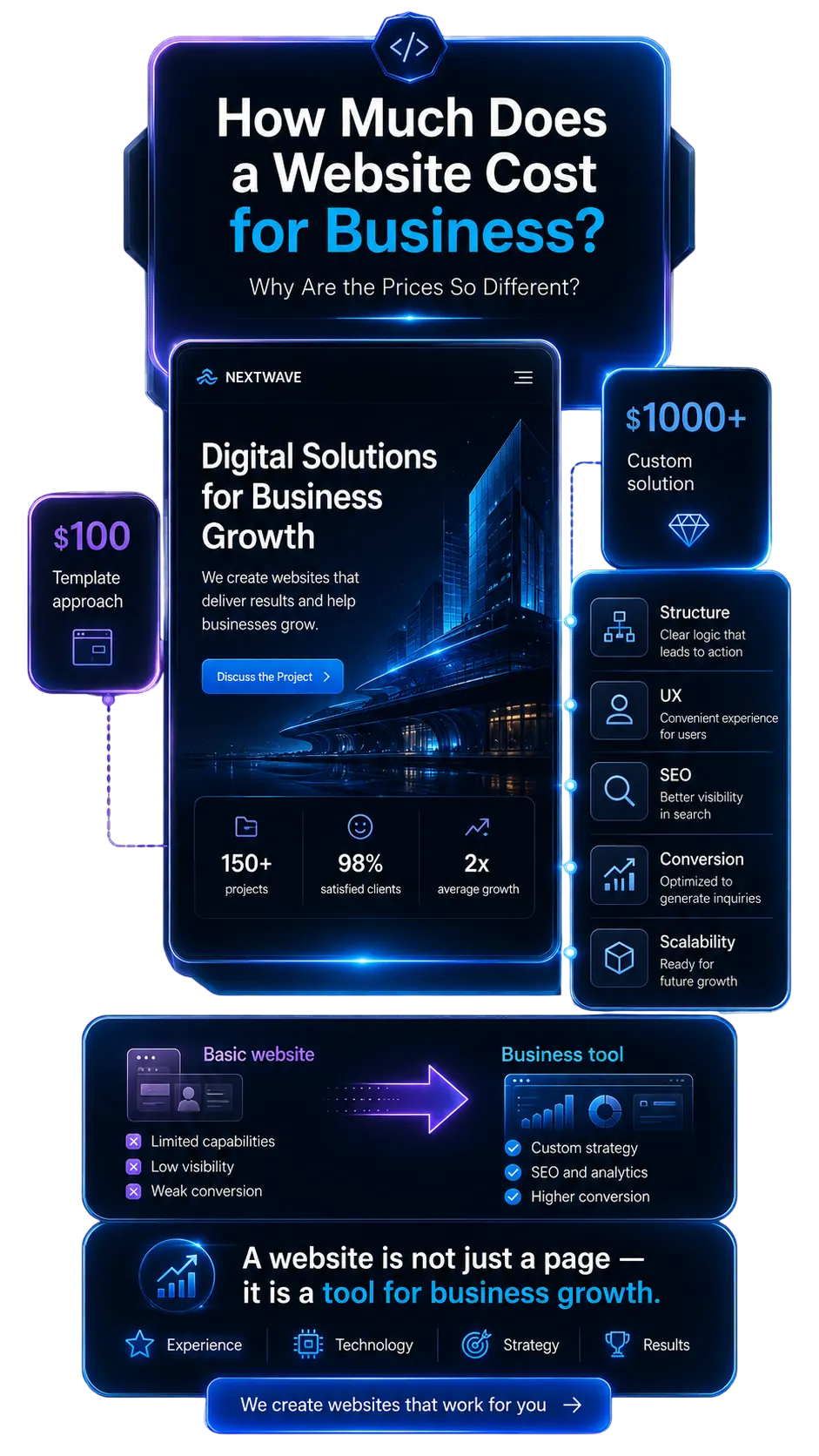
A more expensive website is not always “just a prettier design”. Often, the business pays for deeper work: task analysis, proper structure, quality UX, responsiveness, convenient admin panel, basic SEO foundation, speed, security, testing, and preparation for future development. Such a website should not simply exist online — it should help the business generate leads, sales, customer trust, and better results from advertising.
So the right question is not only “how much does a website cost?”, but “what exactly should the website do for my business?” If you only need minimal online presence, the budget can be lower. If the website should work as a tool for leads, sales, SEO, advertising, or automation, the cost will be higher because the scope of work and responsibility for the result are higher.
Why the Cheapest Website Is Not Always the Most Cost-Effective
The cheapest website may seem like a good deal at the beginning, especially if a business is just starting or wants to appear online quickly. But it is important to look not only at the price, but also at what exactly is included in that price. If the website is built without a proper structure, mobile adaptation, basic SEO, a convenient admin panel, good speed, and tested lead forms, the initial savings can quickly turn into additional costs.
The problem with a cheap website is often not that it is “bad”, but that it may be too limited for the real business task. For example, you may get one simple page, but after a month realize that you need separate service pages, a blog for SEO, multilingual functionality, a catalog, CRM-connected forms, or the ability to edit content independently. If this was not planned from the start, the website will need to be improved or rebuilt completely.
A cheap website may also look acceptable on the outside but have a weak technical foundation. It may load slowly, display poorly on mobile devices, have inconvenient forms, fail to send requests, lack analytics, or be difficult to edit. For a business, this means losing potential customers: people visit the website, do not understand the offer, cannot find the contact button, or simply close the page.
That is why the cheapest website is not always the most cost-effective one. A cost-effective website is the one that matches the business task. If you need a simple temporary page, a small budget may be enough. But if the website needs to work with advertising, leads, SEO, customer trust, or sales, it is better to evaluate not only the starting price, but also the value the website will bring after launch.
A $100 Website: What to Expect from a Minimal Budget
A $100 website usually means a very simple solution with a minimal amount of work. It may be one page based on a ready-made template, basic layout, a few information sections, a contact button, simple design, and minimal content. This type of website can be suitable if a business needs to appear online quickly, test an idea, or have a simple page with contact information.
However, it is important to understand that a minimal budget usually does not include deep business analysis, a well-planned marketing structure, custom UX, full SEO preparation, a complex admin panel, integrations, analytics, speed optimization, or the ability to easily scale the website in the future. In other words, the website may exist online, but it may not be ready to work as a full tool for leads, sales, or promotion.
Most often, a $100 website is a solution for a very simple task: briefly show who you are, what you offer, and how to contact you. If these are the expectations, it can be a reasonable start. But if the business wants to get customers from advertising, rank in Google, have separate service pages, edit content through an admin panel, or grow the website later, a minimal budget may not be enough.
What Is Usually Not Included in a Minimal-Budget Website
A minimal budget usually means that the website covers only a basic task: showing short information, contacts, one service, or a simple offer. This can be a reasonable solution for a start, but it is important to understand its limitations. If a business expects leads, SEO promotion, advertising, a catalog, convenient content editing, or future scaling, a minimal format may not be enough.
Most often, cheap development does not include deep structure planning, target audience analysis, custom design, full SEO logic, a complex admin panel, integrations with CRM, payments, delivery, or external services. Such a website may look finished on the outside but be limited inside: it may be difficult to edit content, add new pages, expand functionality, or use the website as a foundation for advertising and search promotion.
That is why before ordering a cheap website, it is important to honestly answer one question: do you need simple online presence or a real business tool? If the task is to quickly test an idea or create a temporary page, a minimal solution may be enough. But if the website should work long-term, bring leads, sell, rank in Google, and grow together with the business, it is better to plan a wider scope of work from the beginning.
Main Limitations of a Minimal Budget
No deep business strategy — detailed analysis of the audience, competitors, sales funnel, and real customer journey is usually not included.
No unique design from scratch — a ready-made template or a simple block structure is often used instead of a custom visual concept.
No full SEO structure — basic headings and metadata may be included, but without keyword research, separate pages for search queries, internal linking, and SEO logic.
No well-planned UX — the website may have basic sections, but it may not guide the user effectively to a request, purchase, or consultation.
No complex admin panel — content editing may be limited, inconvenient, or dependent on the developer.
No catalog, filters, or cart — these features require separate logic, data structure, testing, and a larger budget.
No payments, delivery, CRM, or API — integrations with external services are usually not included in minimal development.
No deep speed optimization — the website may open, but it may not be well optimized for fast loading and stable performance.
No full testing — with a minimal budget, usually only basic things are checked, without detailed testing of forms, mobile version, browsers, and user scenarios.
No room for scaling — if the website is not designed with growth in mind, adding new pages, languages, accounts, or integrations may require rebuilding.
What Is Often Missing in Cheap Website Development
A cheap website may look finished: it has a hero section, several content blocks, a button, contacts, and even a lead form. But the problem is often not in what you can see immediately, but in what is missing inside. The website may be a nice-looking shell without proper logic, speed, SEO foundation, convenient management, or room for future growth.
For a business, this is risky because the website technically exists, but brings little real value. It may not help attract customers, may perform poorly with advertising, may not be ready for Google promotion, may be difficult to edit, load slowly, or make it hard to add needed functionality without rebuilding. As a result, the business pays twice: first for a cheap launch, and later for fixes, improvements, or a complete replacement.
Cheap development can be acceptable for a temporary page or idea testing. But if the website should work as a tool for leads, sales, trust, and business growth, it is important to understand what is often left “behind the scenes”.
What Exactly Can Become a Problem
No proper sales structure
The website may have sections, but not guide the user to a request. A person visits the page, reads it, does not understand the value, and leaves.No advertising logic
If the page does not explain the offer within the first few seconds, paid traffic is wasted. You pay for clicks, but the website does not help turn them into leads.No SEO foundation
Without proper heading structure, URLs, metadata, copy, and separate service pages, the website may be poorly indexed and fail to bring organic traffic from Google.Weak mobile version
The website may technically “open” on a phone, but still be inconvenient: small text, unclear buttons, long forms, poor spacing. For users, this is a reason to go to a competitor.Difficult content editing
Without a proper admin panel, every change in text, images, prices, or sections may depend on a developer. This limits the business and makes website growth harder.Minimal speed optimization
A slow website loses users, especially from advertising or mobile traffic, where people do not want to wait for a page to load.Forms may be made only “for appearance”
A lead form may not have proper validation, spam protection, notifications, email delivery, or CRM integration. In the worst case, requests may get lost.No analytics
Without Google Analytics, events, goals, or button tracking, it is difficult to understand whether the website works. The business cannot see where users come from or where they drop off.No room for growth
Today the website may seem enough, but tomorrow you may need new pages, a blog, catalog, multilingual functionality, or integrations. If the structure is weak, the website may need to be rebuilt.Functionality may be unproductive
Sometimes cheap websites include sliders, effects, or decorative sections “for beauty”, but they do not help sales, slow down the page, and distract users from the main action.No testing of real user scenarios
The user journey may not be properly tested: opened from phone → read → clicked the button → submitted a request → the business received it. But this path is what brings results.The website does not build trust
If there are no case studies, benefits, proper copy, answers to questions, contacts, policies, or clear presentation, the website may look random and fail to convince the customer to contact you.
$100 Website vs $1000 Website: Key Differences
At first glance, a $100 website and a $1000 website may look similar: a hero section, several content blocks, a contact button, a lead form, and contact details. But the real difference is usually not only in visuals. It is in how well the website is planned, how it works, how convenient it is for users, whether it can be edited, promoted, scaled, and used as a real business tool.
Website Structure: Just Sections or a Customer Journey
In a $100 website, the structure is often very simple: hero section, description, a few benefits, and contacts. This may be enough for a minimal page, but it does not always help users understand the company, service, advantages, and next step.
In a $1000 website, the structure is usually planned around the business task. For example, for a corporate website, it is important to show services, case studies, team, facts, contacts, FAQ, and build trust in the company. Such a website does not just “show information” — it guides the user toward a request, consultation, or contact.
Design: Template or Custom Brand Presentation
A cheap website is often built using a ready-made template. This is fast and may look acceptable, but there is a risk that the website will look like dozens of other projects and fail to communicate the character of your business.
In a more expensive website, the design is usually adapted to the brand, niche, services, and audience expectations. It is not only about beauty, but also about clear presentation: which sections users see first, where the key accents are placed, how trust is shown, and how the website feels modern while remaining convenient.
Mobile Version: Just Opens or Actually Works Well
With a minimal budget, the mobile version may be done formally: the website opens on a phone, but the text is small, spacing is inconvenient, buttons are unclear, and the lead form is not comfortable to fill in.
In higher-quality development, the mobile version is treated as a key user scenario. Most users visit from phones, so the website must load quickly, be easy to read, have clear buttons, simple navigation, and a short path to inquiry.
SEO: No Foundation or Prepared for Promotion
A $100 website often does not have a proper SEO foundation. Basic title and description may be filled in, but without page logic, heading structure, clean URLs, sitemap, separate service pages, and future content growth.
A $1000 website is more likely to include basic SEO preparation: clear page structure, proper headings, metadata, clean URLs, sitemap, technical accuracy, and the ability to add new SEO pages. This does not guarantee instant top Google rankings, but it makes the website more ready for promotion. In CreonixLab’s corporate website packages, basic SEO, sitemap, title, description, and SEO structure are directly included in the approach
Admin Panel: Developer Dependency or Content Control
In a cheap website, content editing may be limited. Sometimes the business owner cannot properly change texts, images, buttons, contacts, or pages without contacting a developer. This may seem minor until you need to quickly update a service, price, promotion, or information.
In more expensive development, a convenient admin panel is usually set up. The team can independently update content, add pages, change images, edit services, publish blog posts or news. For a business, this means saving time and having more control after launch. On the CreonixLab page, easy editing of texts and images through the admin panel is also highlighted as one of the WordPress advantages.
Forms, Leads, and Analytics: “There Is a Button” or Everything Works Systematically
A cheap website may have a lead form, but it is not always clear what happens after submission. Does the message arrive by email? Are requests lost? Is there spam protection? Can button clicks be tracked? Can the business see which pages generate inquiries?
In a higher-quality website, forms, leads, and analytics are planned as part of the business process. A request should be delivered reliably, the user should receive a clear response, and the business should have data for analysis. This is especially important for a corporate website because it often works as the entry point for inquiries and consultations.
Scalability: Temporary Page or Website Ready for Growth
A $100 website is often created for the current minimal task. This can be acceptable if nothing else is planned. But when the business grows, new needs quickly appear: service pages, blog, multilingual functionality, catalog, filters, accounts, integrations, or more complex forms.
A $1000 website is more often planned so it can be developed further. This does not mean that everything must be built immediately. But it is important that the structure and technology allow new sections to be added without a complete rebuild. CreonixLab also emphasizes this approach: packages can be adapted to the project, and the website can be prepared for future expansion.
Business Result: “The Website Exists” or It Helps Sell and Build Trust
The main difference between a cheap website and a well-planned one is not only the number of sections. The difference is whether the website actually helps the business. A $100 website may simply confirm that the company exists. But a higher-budget website should work deeper: explain services, show advantages, build trust, answer questions, and guide the user to contact.
For a corporate website, this is especially important. A customer often compares companies, looks at experience, case studies, approach, contacts, presentation quality, and overall impression. If the website looks weak or random, it can reduce trust before the first call. If the website is well planned, it strengthens the company image and helps generate more prepared inquiries.
What Website Budget Should a Business Choose
A website budget should be chosen not only by the amount of money, but by the task the website needs to solve. A simple landing page for advertising, a corporate website for trust, an online store for sales, and an online service with accounts are different formats, different scopes of work, and different levels of responsibility.
Below are approximate budget ranges that help understand which format may suit a business at the start. These are not fixed prices for every project, but a pricing logic: the more pages, features, integrations, design, SEO, and business logic are needed, the higher the budget will be.
Simple Starter Website
Approximate budget from $100–300
This is a minimal option for a business that needs to appear online quickly: show basic information, contacts, one service, or a short presentation. Such a website can be built using a ready-made template or a simple structure without deep business analysis, SEO strategy, or complex functionality.
It can be suitable for testing an idea, creating a temporary page, a small local business, or a link from Instagram. But it should not be treated as a full tool for SEO, advertising, sales, or future scaling.
Landing Page for Advertising or One Service
Approximate budget from $400–800
A landing page is suitable when you need to sell one service, product, promotion, or test a specific offer through advertising. Here, it is important not just to create a beautiful page, but to build the user journey correctly: hero section, benefits, offer explanation, trust block, lead form, call-to-action buttons, and responsive mobile version.
This format can be a good solution for services, consultations, courses, local businesses, advertising launches, or quick demand testing. The budget depends on design complexity, number of sections, animations, copy, SEO preparation, and analytics setup.
Corporate Website for a Company
Approximate budget from $700–1500+
A corporate website is needed for a business that wants not just to have a page online, but to professionally present the company, services, case studies, team, advantages, and approach. This is a good format for companies where trust matters: B2B, financial services, education, manufacturing, consulting, construction, healthcare, IT, or service businesses.
The budget for such a website usually includes page structure, design, responsive layout, admin panel, service pages, basic SEO, lead forms, contacts, blog or news section, speed, security, and room for future expansion. Such a website works not only as a business card, but as a foundation for leads, SEO promotion, advertising, and brand trust.
Catalog Website
Approximate budget from $900–2000+
A catalog website is suitable for a business that has many products, services, objects, or offers, but does not necessarily need online payment. For example, it can be a catalog of equipment, real estate, auto parts, furniture, machinery, services, or B2B offers, where the customer first views items and then submits a request or contacts a manager.
In this type of website, categories, item pages, filters, search, sorting, convenient admin management, and a logical SEO structure are important. The budget depends on the number of categories, product or service fields, filters, language versions, card design, and future expansion.
Online Store
Approximate budget from $1200–3000+
An online store is needed when the website should not only show products, but also accept orders online. Here, not only a beautiful storefront matters, but the entire sales logic: catalog, filters, product pages, cart, checkout, payment, delivery, statuses, notifications, and an admin panel for managing products and orders.
The budget for an online store depends on the number of products and categories, filter complexity, delivery methods, payment systems, personal account, promo codes, promotions, multilingual functionality, SEO structure, and integrations. The more the store needs to automate, the more work should be planned from the start.
Online Service or Custom System
Approximate budget from $1400–2200+
An online service is no longer just a website, but a system built around a specific business process. It is needed when there are personal accounts, user roles, booking, calendars, request statuses, CRM logic, payments, API integrations, documents, notifications, or internal automation.
Such projects are often developed individually because a ready-made template cannot fully cover non-standard business logic. The budget depends on the number of roles, user scenarios, admin panel complexity, integrations, security, load, scalability, and testing. This is a choice for businesses that need the website not as a showcase, but as a working tool.