What Is an Online Booking Website
An online booking website is a website where a customer can choose a service, date, time, and submit a booking request without long conversations in direct messages, messengers, or phone calls. It is useful for businesses where people regularly book services: salons, barbershops, auto service stations, clinics, studios, consultations, education, service companies, or any business that works with a schedule.
Unlike a regular “Submit a request” form, online booking gives the customer more clarity. The person does not simply write “I want to book”; they can immediately see what services are available, how long they take, when there is free time, which specialist they can choose, and what to do next. This reduces unnecessary questions and makes the path to booking shorter.
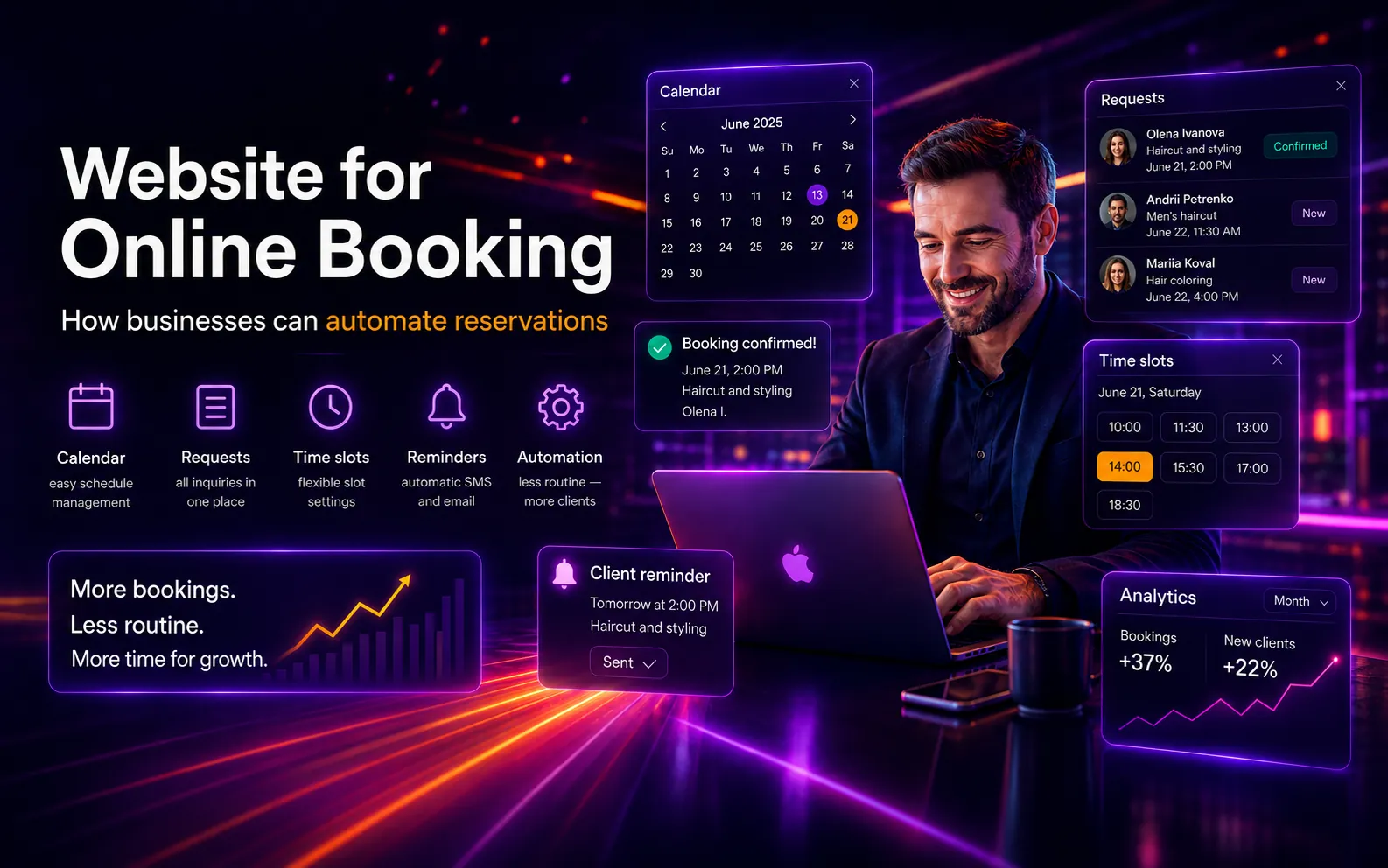
For the business, such a website works as a booking management system. An administrator can see all appointments in one place, change statuses, add services, manage schedules, specialists, available time slots, and receive notifications about new requests. This helps avoid losing customers, getting confused in messages, or keeping appointments manually in different spreadsheets or notes.
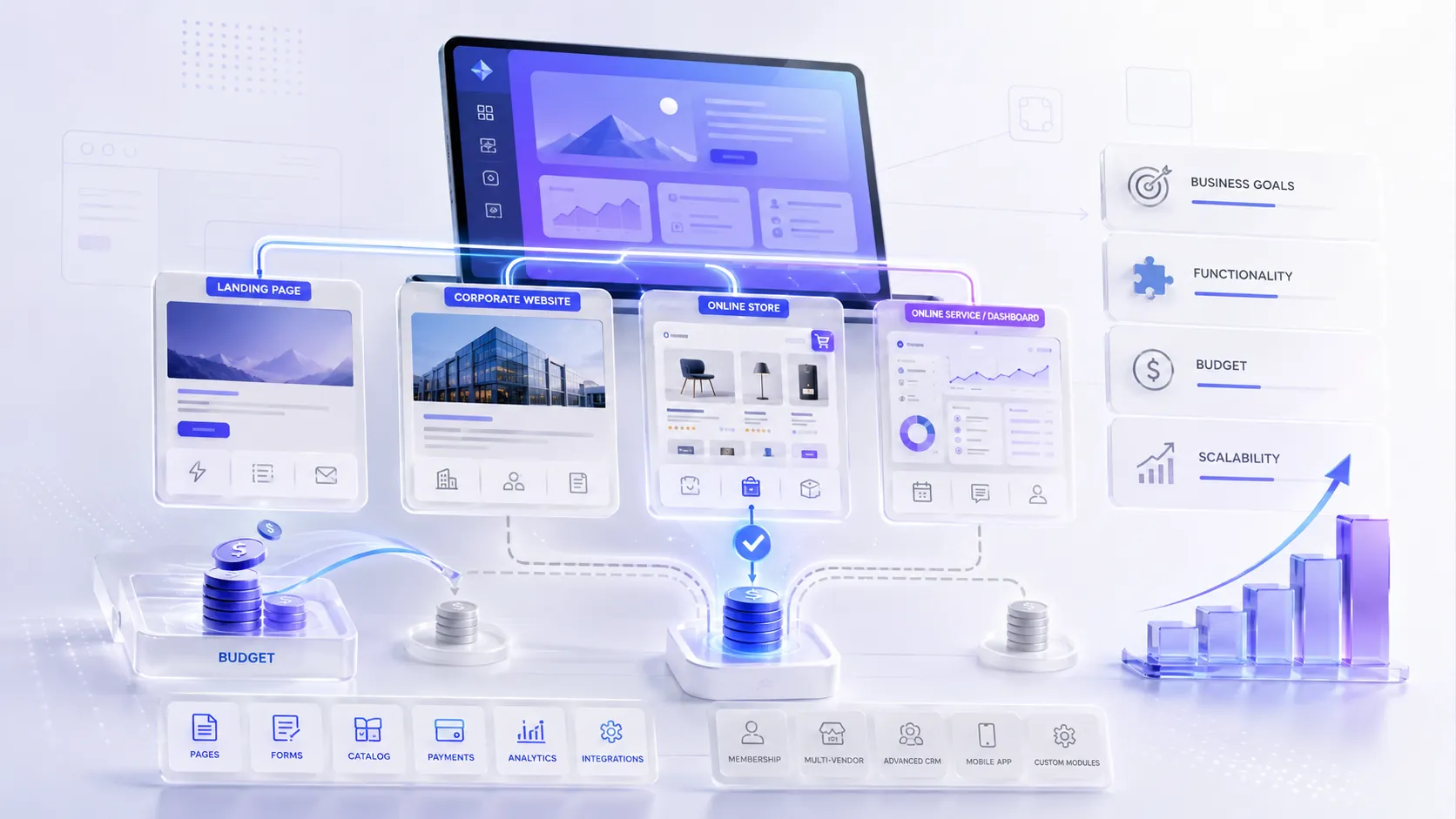
An online booking website can be simple or more advanced. At the start, it may be a page with services, a booking form, and a notification for the administrator. For a larger business, it can become a full system: calendar, personal accounts, user roles, booking confirmation, reminders, online payment, CRM integration, Telegram or email notifications.
The main value of online booking is convenience. The customer can book at a time that suits them, even when the business is no longer responding during working hours. And the business gets a more organized process: less manual messaging, fewer scheduling mistakes, faster request handling, and a better service experience for customers.
Why Manual Booking Through Direct Messages and Phone Calls Limits a Business
Manual booking through Instagram, TikTok, phone calls, or messengers can work well at the beginning. When there are only a few requests, it may feel like everything is under control: a customer sends a message, the administrator replies, chooses a time, and writes the booking down in a spreadsheet or notes. But when the number of inquiries grows, this process starts taking too much time and creating mistakes.
The main problem with manual booking is that everything depends on a person. Someone has to notice the message in time, reply to the customer, check available time, clarify the service, agree on the specialist, add the booking to the schedule, and later remind the customer about the visit. If the administrator is busy, the customer waits. If there are many messages, some requests can get lost. If the schedule is managed manually, it is easy to make a timing mistake or create a double booking.
For the customer, this is not always convenient either. A person wants to quickly understand when there is an available slot, how long the service takes, who can provide it, and how to book. If they need to wait for a reply in direct messages or clarify the time several times by phone, some customers may postpone the decision or go to a competitor where booking is easier.
Manual booking also limits business growth. As the number of requests increases, the team spends more time not on service or sales, but on messaging, clarifications, rescheduling, reminders, and checking the schedule. It becomes harder for the business to see the full picture: how many bookings there are per day, which services are more popular, which specialists are busy, how many requests were lost, and which customers return again.
An online booking website helps remove this chaos. The customer can see available services, dates, and time slots, while the business receives requests in one place. This does not mean that live communication is no longer needed. But routine tasks — choosing a time, collecting contacts, confirmations, statuses, and notifications — are better automated so the business does not lose customers or overload the team.
How a Customer Books a Service Through a Website
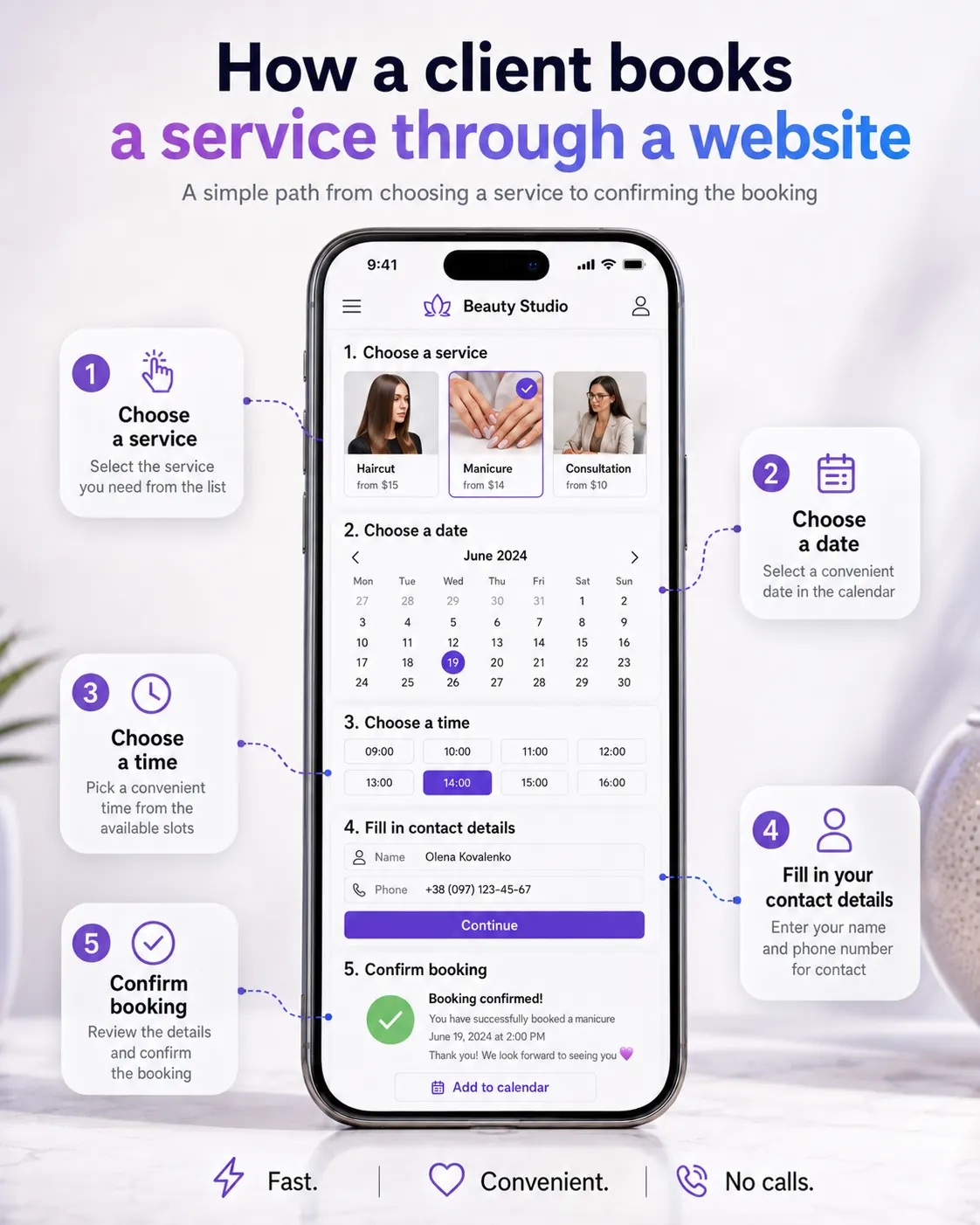
Online booking should be simple for the customer. A person should not have to search for where to click, write in direct messages, wait for a reply, or clarify available time several times. A good website guides the customer through a clear path: from choosing a service to confirming the booking.
First, the user chooses the needed service. This can be a consultation, procedure, repair, diagnostics, lesson, training session, or any other appointment-based service. It is important to show a short description next to the service: what is included, how long it takes, the approximate price, and who it is suitable for. This helps the customer understand faster what they actually need.
After that, the customer chooses a date and time. If available slots are set up on the website, the person immediately sees open options and does not need to ask: “When do you have free time?”. This saves time for both the customer and the business. If the company has several specialists, the user can choose a specific person or let the system assign any available specialist.
Next, the customer leaves contact details: name, phone number, email, or messenger. The form should be short and clear. It is better not to ask for unnecessary information at the first step if it is not required for the booking. The simpler the process, the lower the chance that the person will close the page before completing the appointment.
After submitting the request, the customer should receive a clear confirmation: the booking has been received, is waiting for confirmation, or is already confirmed. If needed, the system can send a notification by email, Telegram, SMS, or another channel. For the business, this creates an organized process: the request is not lost, the time is fixed, the administrator sees the booking in the admin panel, and the customer understands that their request has been received.
The main value of this scenario is that the customer can book quickly and without unnecessary steps. They do not wait for a reply during working hours, scroll through messages, or clarify details several times. The website helps them move through the process: choose a service, time, specialist, and submit a booking request.
What a Business Sees in the Admin Panel
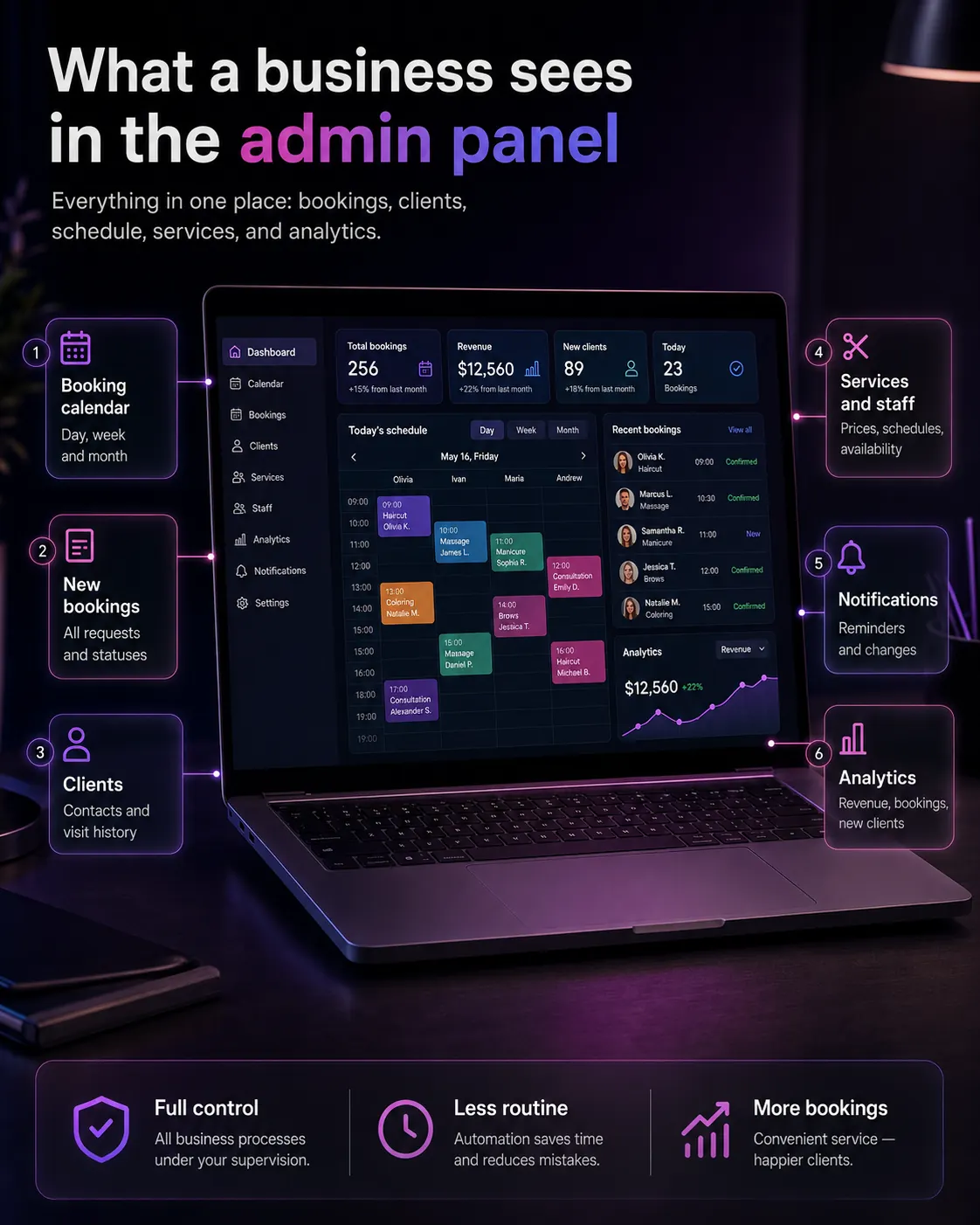
An online booking website should be convenient not only for the customer, but also for the business. If the customer sees a simple booking form, the business should see the full appointment management system: who booked, which service they selected, what time they chose, which specialist is assigned, and what status the request has.
The admin panel helps keep all bookings in one place. Instead of searching for customers in direct messages, phone calls, notes, spreadsheets, or messengers, the administrator opens the panel and sees the current picture: new requests, confirmed bookings, cancellations, rescheduled appointments, specialist workload, and available time slots.
For a business, this is important because online booking without a convenient admin panel quickly becomes just another form. A full system allows you not only to accept requests, but also to manage the process: change statuses, add services, edit schedules, assign specialists, view customer history, and control the team’s work.
Which Businesses Benefit Most from Online Booking
Online booking is especially useful for businesses where customers need to choose a service, date, time, or specialist. If appointments are currently handled through direct messages, phone calls, messengers, or spreadsheets, an online booking website helps reduce chaos, avoid losing requests, and make the service more convenient for customers.
This functionality is not only for large companies. Online booking can be useful for local businesses, individual specialists, and service companies if they have regular inquiries, schedules, returning customers, or the need to confirm bookings quickly.
Beauty Salons and Beauty Studios
Для салонів краси онлайн-запис може суттєво спростити роботу адміністратора. Клієнт сам обирає послугу, майстра, дату й час, а бізнес бачить усі записи в одному місці. Це зручно для манікюру, перукарських послуг, косметології, макіяжу, брів, вій, масажу та інших процедур.
Такий сайт допомагає зменшити кількість повідомлень у direct, уникати дублювання записів і швидше показувати клієнту вільний час. Для б’юті-бізнесу це ще й спосіб виглядати професійніше: клієнт не чекає відповіді, а може записатися тоді, коли йому зручно.
Barbershops and Hair Salons
In barbershops and hair salons, customers often want to book a specific specialist. Online booking allows you to show each specialist’s schedule, available slots, services, duration, and price. This reduces manual clarifications and helps distribute workload between team members more effectively.
For the customer, the scenario is simple: visit the website, choose a specialist, select a time, and confirm the booking. For the business, this means fewer missed messages and more control over the schedule.
Auto Service Stations and Car Repair Services
For auto service stations, online booking is useful because customers often request different types of work: diagnostics, oil change, suspension repair, tire service, electrical work, air conditioning service, or other services. The website can help the customer choose the needed service, date, time, and provide vehicle details.
For the auto service business, this creates more order: requests are not lost in phone calls, the administrator sees scheduled work, and the team can better plan specialist and workstation workload.
Medical Clinics and Dental Clinics
For clinics, online booking helps organize patient appointments and reduce the workload on administrators. A patient can choose a department, doctor, date, time, and leave contact details. This is convenient for consultations, dentistry, diagnostics, procedures, or repeat visits.
In such projects, clear services, doctors’ schedules, booking statuses, confirmations, and reminders are especially important. When the booking process is simple, it becomes easier for the patient to take the first step and not postpone the visit.
Sports Studios, Coaches, and Fitness Services
Online booking works well for fitness studios, yoga, dance classes, personal training, group sessions, or coach consultations. The customer can choose a direction, coach, date, time, or group, while the business sees the number of participants and schedule workload.
This is especially useful when there is a limited number of spots in a class or different training formats. The system helps avoid overcrowded groups, prevent lost requests, and confirm participation faster.
Online Schools, Courses, and Consultations
For online schools and consultations, a booking website can help organize trial lessons, consultations, interviews, group classes, or individual sessions. The customer chooses a convenient time, submits a request, and the team sees the booking in the system.
This is convenient for language schools, tutors, mentors, psychologists, coaches, educational platforms, and consulting services. If there are many inquiries from social media or advertising, online booking helps avoid losing people at the first contact stage.
Individual Specialists and Experts
Online booking is useful not only for companies, but also for individual specialists: psychologists, consultants, tutors, craftsmen, coaches, photographers, designers, or freelancers. If people regularly ask about available time, services, and terms, a website can take over part of this communication.
For an expert, this looks more professional: the customer sees services, work format, available slots, and can submit a request without long messaging. This saves time and helps organize the schedule better.
Repair and Service Companies
Companies that provide on-site or service-based work can also use online booking. This may include appliance repair, cleaning, installation, equipment maintenance, measurements, diagnostics, or specialist consultation.
The customer can choose the type of service, convenient time, leave an address, or briefly describe the issue. The business receives a structured request instead of a chaotic message in a messenger. This helps process inquiries faster and plan team visits more effectively.
Restaurants, Coworking Spaces, and Venues
Online booking can be useful for businesses where customers reserve a place, time, or space: restaurants, coworking spaces, studios, halls, photo studios, conference spaces, or event venues. The customer can choose a date, time, number of people, or the needed booking format.
For the business, this reduces the number of phone clarifications and helps better control the availability of tables, rooms, halls, or resources. This is especially important when bookings often change or there are several available zones.
How a Website Helps Manage Schedules and Available Time
One of the main advantages of an online booking website is the ability to show customers only the time that is actually available for booking. Instead of messaging back and forth with questions like “When do you have free time?”, the customer immediately sees dates, hours, services, and available slots. This shortens the path to booking and reduces manual clarification for the administrator.
For the business, this means more order in the schedule. The system can take into account working days, days off, breaks, the duration of each service, and the workload of specialists. For example, if one service takes 30 minutes and another takes 2 hours, the website can show only those slots where there is enough time to complete the selected service.
If the company has several specialists, doctors, trainers, or consultants, the website can help distribute appointments between them. The customer can choose a specific specialist or book with any available one. At the same time, the business can see who is busier, which hours are most popular, and where free time slots remain.
This approach helps avoid duplicate bookings, timing mistakes, and chaos in spreadsheets. The schedule becomes not just a list of appointments, but a manageable system: the administrator can edit slots, reschedule bookings, close unavailable hours, add new specialists, and respond to changes faster. For the customer, it means convenience; for the business, it means control and less manual work.
Contact Form or Full Booking System: What Is the Difference
A contact form is the simplest way to receive a customer’s contact details. A person leaves their name, phone number, email, or a short comment, and then the administrator contacts them, clarifies the service, checks available time, agrees on a date, and adds the appointment to the schedule manually. This option works well when there are not many inquiries or when each request needs to be discussed individually first.
A full booking system works differently. The customer does not just leave contact details — they follow a specific scenario: choose a service, date, time, specialist, view available slots, and receive booking confirmation. In other words, the system takes over part of the work that the administrator used to do manually.
The main difference is that a contact form only collects inquiries, while online booking helps manage the appointment process. A form answers the question: “Who wants to contact the business?” Booking answers more questions: “Which service?”, “When?”, “With which specialist?”, “What is the booking status?”, “Is there available time?”, “Is confirmation or payment needed?”
If the business only needs to receive a contact and clarify everything manually later, a contact form may be enough. But if customers often ask about available time, services, specialists, rescheduling, or confirmation, a full booking system is a better option. It reduces the number of messages, helps avoid duplicate bookings, and makes the service more convenient for customers.
When a Contact Form Is Enough
A contact form can be a good solution at the start if the business is only testing demand, has a small number of inquiries, or works with individual requests. For example, when the price depends on details, a consultation is needed first, or a manager must manually choose the right solution for the customer.
-
When Booking Is Better
A full booking system is better when the business regularly works with appointments, has a schedule, several services, specialists, available slots, confirmations, rescheduling, or reminders. In this case, the website does not just receive inquiries — it helps organize the business workflow.
Why Convenient Booking Affects Leads and Sales
Convenient booking directly affects the number of inquiries because it shortens the customer’s path to action. If a person needs to write in direct messages, wait for a reply, clarify available time, and agree on details several times, some customers will simply postpone the booking or go to a competitor. When everything is clear on the website — service, date, time, specialist, and booking button — it becomes easier for the customer to make a decision immediately.
Online booking is especially important for customers who visit the website outside working hours. A person may see your service in the evening, on a weekend, or after viewing an ad and immediately reserve a convenient time. The business does not lose the inquiry just because the administrator did not reply instantly. The website works 24/7 and accepts requests when it is convenient for the customer.
Convenient booking also increases trust in the business. When the customer sees a clear process, available slots, booking confirmation, and proper communication, the company looks more organized and professional. This is especially important for salons, clinics, auto service stations, studios, consultations, education, and any service where the customer wants to be sure their booking will not be lost.
For the business, online booking helps not only receive more inquiries, but also manage sales better. The system shows which services are booked more often, which hours are the busiest, which specialists are more popular, how many requests come from the website, and where the process can be improved. In other words, booking becomes not just a convenience for the customer, but a tool for growth, planning, and increasing revenue.
Order an Online Booking Website for Your Business
If your business regularly receives appointments for services, consultations, procedures, repairs, classes, or meetings, an online booking website can make the process much easier. Instead of constant direct messages, phone calls, spreadsheets, and manual time coordination, customers can choose a service, date, time, and submit a request directly on the website.
At CreonixLab, we create Laravel-based online booking services with a calendar, available time slots, admin panel, service management, schedules, booking statuses, notifications, and possible integrations with CRM, Telegram, email, payments, or other services. This solution can be adapted to a specific business process: salon, clinic, auto service station, studio, consultant, online school, or service company.
You can start with a simpler booking version: service selection, date, time, contact details, and basic request management. If the business needs a more advanced system, it can include several specialists, individual schedules, statuses, reminders, customer database, booking history, reports, and integrations.
The main goal of such a website is not just to add a “Book Now” button, but to make booking convenient for customers and manageable for the business. You get a clear process: the customer books online, the administrator sees the request in the panel, the team manages the schedule without chaos, and the business does not lose inquiries because of slow replies or manual planning.